Articles · Dominik Mayer · Products, Asia, Productivity
Turning Strangers Into Friends
Events bring us into the same room, but not into each other’s lives. After years of hosting meetups, I’ve learned that when you take care of the room’s layout and how people interact, you can multiply the odds of meaningful connection.
Marcus is halfway through explaining why this is Bitcoin’s breakthrough year when you notice it. Three seats down, laughter bursts from a group sharing their weekend hiking disasters. You’d love to join them, but between you and them is the vintage board-game collector, already shuffling through the rules of something called Wingspan. You’re trapped.
At a networking event, you cling to the first friendly face. Like shipwreck survivors, the two of you circle the room, eyeing clusters of laughter you can’t reach without crossing an awkward gap and intruding mid-sentence. So you don’t. You retreat to the snack table, make another loop with your safety partner, and leave early.
At a presentation, you sit with sixty other people in silence. When the last important question is asked, everyone’s stiff, tired, and ready to leave. A few brave souls attempt post-talk mingling, but no one wants to force polite chatter.
Most events bring people together physically, but not socially.
I once went to a meetup called Overcome Loneliness where dozens of lonely digital nomads sat quietly side by side, watching someone speak from Singapore – through a screen!
Compare this to a party at a friend’s house, a dynamic event with different areas. Within minutes of arriving, you’re talking to a couple of people. You know someone who knows someone, and it’s natural to join the conversation. By the end of the night, you’ve made new friends.
Experiences like this are rare. Even when people manage to talk, they rarely get past the surface. Two people with the same obscure passion exchange the usual script about where they’re from and what they do, then walk away, never knowing they’re both hooked on retro arcade games, obsessed with brewing the perfect stout, or devoted to late-night poetry debates. They were one question away from a fun conversation and didn’t know it.1
After six years hosting meetups, I’ve learned that you can recreate the house party atmosphere by designing the interaction around three elements:
- Dynamic movement for a natural flow.
- Proximity for conversations close enough to catch and join.
- Introductions for intentional connections.
Dynamic Movement
You want people flowing through the room like atoms, bumping into each other to form brief connections before breaking apart to mix again.
Picture a cocktail party: Someone gets a drink, joins a conversation by the window, then drifts to another group by the door. That’s the movement you want. But certain setups make it impossible.
Meet the long table. You can only join where there’s an empty chair, and once you sit you’re stuck talking to your immediate neighbors. Group topics stay superficial to include everyone. Escaping isn’t easy. “Hey, Frank, great talking, but I should catch Phil before he disappears.”
In a space where people can mix and mingle, you can talk to almost anyone. Walk up to a group, and they naturally open to let you in. Joining the right conversation becomes effortless.
Instead of long tables, create condensation points, spots where people naturally gather. Like the kitchen at a house party, the smokers’ corner, or the bar line.
Use cocktail tables with bar stools so people can rest for a moment without settling in. Provide only a few stools, so most guests remain standing and moving.
Keep circulating even if others are sitting. Make it clear this isn’t the kind of night where people stay put.
Proximity
But movement alone isn’t enough. The layout sets the tone for everything that follows. You can tell within minutes if it’ll be a night of easy mixing or small circles of people sticking to their friends.
If groups are too far apart, they’ll form little bubbles, each with its own gravity but no exchange. People stick to the first conversation they stumble into and never drift to another, as no one wants to cross a yawning void to step into a group that’s watching them approach.
In a good space, you overhear others discussing something interesting and casually turn around to join in. Who would have thought that Frank, you tried to escape from earlier, is a hidden gem – once you get him talking about his sourdough experiments.
To encourage these natural encounters, arrange tables2 with enough space for two or three people to stand between them. Closer than that and they blend into one big table, with no easy way to get around. Too far apart and conversations become isolated islands.
At the start of the event, when attendance is light, keep early arrivals close so the first conversations happen within earshot of each other. As more people arrive, the group naturally expands and divides but maintains that connected feeling.
A good layout will help people mix and mingle. But if you want to take it to the next level, you don’t just let the room do the work, you actively connect the people in it.
Introductions
There’s nothing more awkward than being sent into a room full of strangers, not knowing who to approach. But no one should have to figure this out alone.
When someone arrives, introduce them to a couple of people. You don’t have to know them. Ask their names and connect them. “Josh, Rob. Rob, Josh.” If someone is standing alone, do it again.
Add context when you can, using whatever you just learned: “Sophie is a Korean philosopher who started a travel YouTube channel.”
Magic happens when you spot a link and walk someone across the room: Josh wants to visit Seoul; Sophie just moved from there. You’re not just connecting two people, you’re teaching them the social map of the event. Now Rob knows where the creative travelers hang out and can introduce Sophie to the product management group.
Within an hour, you’ve created a web where everyone knows someone who knows someone else. The shy person who walked in alone now has three groups they can rejoin, and they’re confident enough to bring someone with them.
Peter Finger, who used to run my university’s alumni events, showed me how this is done. At his events, he’d remember your story3 and know exactly who to connect you with. He’s not doing it for himself. He’s doing it for you. He knows how to give everyone a good time.4
Multiplying the Odds
We never know who will connect or why. Chemistry is mysterious. But we can create more opportunities for it.
Here’s what happens: The accountant passionate about urban beekeeping gets stuck talking to three people about crunching numbers and goes home feeling disconnected. If she’d had ten conversations instead of three, if she’d overheard someone mention sustainability, if she’d been introduced as “the one with the rooftop hives” she might have found her people.
More shots, better aim. Every conversation is a chance to discover connection. Every overheard comment is a potential hook. Every context-rich introduction is a shortcut past small talk.
Movement, proximity, and introductions multiply the odds of a genuine connection, one that lasts beyond the event. When all three come together, you get the kind of night you come home from smiling, not quite knowing why.
Your next event could connect the banker with his new head of IT, the introvert with her badminton partner, or the immigrant with the love of his life. It could spark a friendship, a romance, a future. And you might never know.
Design for connection, then watch what happens.
Let me know how it goes.
Consider adding conversation triggers. A Polaroid camera, a book, or a map of attendee countries can create natural talking points at these spots. ↩︎
Peter even taught me a trick: If you forgot someone’s name, take a guess. When they correct you, you’re far more likely to remember it next time. He isn’t afraid to get it wrong today – because he cares about getting it right in the long run. ↩︎
This is what networking is about. It’s not about getting “connections” to “leverage”. It’s meeting interesting people and making new friends. And then you might help each other because you genuinely like each other. ↩︎
ICloud Drive Silently Deletes Your Content
The first time it happened, I was writing a paper. The paragraphs I had just typed vanished into thin air, faster than Time Machine or Backblaze could save them. Gone. The next occurrence was during app development; Xcode suddenly flagged numerous errors in previously error-free code. My recent changes to several files were erased.
Months later, the mystery is solved: iCloud Drive detected a file conflict. It assumed different versions of the same file existed on my Mac and iPhone and couldn’t merge them automatically. This was impossible; the affected files were never opened on the iPhone. But they were in iCloud, as I had moved my Mac’s Documents folder there.
Dropbox manages version conflicts by storing all conflicting files side by side, labeled as “(John Doe’s conflicted copy)“. iCloud Drive, however, doesn’t show these conflicts in the file system. If you open the file in an editor that supports conflict handling, a popup appears asking which version to keep. Editors like Textifier, Xcode, or Obsidian, lacking conflict handling, leave iCloud to decide which version to store on your disk and in your backup.
Over time, newer backups overwrite older ones containing the correct version; your content is gone for good. The only way to get it back is to open the file with an editor that supports conflict resolution.1 Once moved out of iCloud Drive, even that won’t help. The content is lost.2
Masking version conflicts might appear user-friendly, but it has catastrophic consequences. You might not discover the data loss until years later, when reopening significant but infrequently used documents.
Until iCloud Drive exposes version conflicts in the file system or a central, easily accessible location, my strong recommendation is to move all crucial data out of it. Meanwhile, set up a Git repository to monitor your critical files; you might uncover surprising changes.
Update: For files that need to stay in iCloud Drive I’m building Cloud Cub, a simple way to detect and resolve hidden sync conflicts before they cause data loss.
The Best Productivity Apps for Mac
A Quora user asked for the best productivity apps for Mac OS. Here’s my answer:
There are of course the big productivity suites like OmniFocus and Things but I want to focus on the small helpers that save me several hours per week.
BetterTouchTool
My number one pick is BetterTouchTool. It’s a small, free application that lets you map actions to various forms of input. Some of the trackpad shortcuts I use all the time:
- Three finger swipe down → Minimize window to dock
- Four finger tap → Close Window below cursor
- Four finger click → ⌘W (Close tab/window)
- Three finger click → Middle click (lets you open links in a new tab)
You can also define application specific shortcuts:
Chrome
- Five finger click → ⌘⇧T (reopen closed tab)
- Three finger swipe left → ^Page down (switch to the tab on the right)
- Three finger swipe right → ^Page up (switch to the tab on the left)
OmniFocus
- Three finger swipe right → ⌘⇧R (mark as reviewed)
- Three finger swipe left → ⌘K (update view, i.e. remove tasks that no longer belong into the current perspective)
You see the pattern. The tab switching is something I add to every app I’m using on a regular basis. Similar to going back and forth in history (Finder, Spotify, …).
You can also trigger actions from the keyboard, a normal and a magic mouse, an apple remote, Leap and from the BTT iOS app.
Hazel
Hazel is another tool I’m using on a daily basis. Well, I’m not actively using it. It’s running in the background doing its fantastic job.
Hazel asks you for folders to monitor. You can then define rules to apply on the files in this folder.
Some examples of my Hazel rules:
Download
- Archive old files
- Rename and move PDFs from my banks, phone companies, … into the corresponding folders
- Move files downloaded from Facebook to a special folder
Scan Inbox
(This is the folder in which my ScanSnap document scanner dumps all the PDFs it creates.)
- Add date and time (extracted from the document)
- Move bills to a special folder
- Move processed files (scans that got a date and a description) to a special folder
Desktop
- Move Screenshots to a special folder
Screenshots
- Move everything that’s not a screenshot but ends up here back to the Desktop
Alfred
Alfred is a launcher that you invoke with a keyboard shortcut. It can do many helpful things like find files, eject volumes, quit programs. It also lets you define search engines so you don’t have to open/navigate to your browser to start your search.
You can define complex actions, called workflows, or download shared ones. My favorite one searches LEO (one of the best German English/French/Spanish/Chinese/… dictionaries) and shows the results in Alfred.
Fighting Multitasking One Pomodoro a Time

(Image: Luca Mascaro)
Multitasking is a great feature of most modern operating systems. Unfortunately, the human brain was created a while ago so our implementation is far away from being perfect. Problems occur in both kinds of human multitasking:
Real multitasking
Real multitasking is when you do two things at the same time. Reading while listening to music, finishing a mail while watching TV or eating and talking to your wife. From my experience, real multitasking does only work when you don’t have to split your attention, when you don’t have to focus on more than one thing. Listening to the radio while driving a car is relaxing. But once you run into a critical situation, one that needs your attention, the radio becomes either distracting or you completely block it off, not realizing that it’s still playing.
Looking at the examples, I’d say that food and wife is great, e-mail plus TV will never work and reading with music depends on the music. In my case, it doesn’t work if I understand the lyrics. So what’s the cure for not working real multitasking? Get rid of the distraction. Turn off the TV, go to another room, get earplugs. Whatever.
Pseudo multitasking
Context Switching is the technique a single-CPU computer uses to emulate multitasking. It can’t process two things at the same time so it switches back and forth between all the tasks it has to finish. In that, the CPU has a huge advantage over the human brain: It is not bothered by unnecessary thoughts. It loads, stores, loads, stores all the things it needs to know in order to do exactly what it’s supposed to do. If only we had that capability.
When we work on something, get stuck and check our mails or then talk to a colleague, our mind will not save the exact state it had when we switched focus. And it will not be able to get back into that exact state because there are too many new things that have happened in the meantime. Maybe it wasn’t even necessary to check the mails. Did we just want to get away from what we should have been working on?
I found out that I’m highly prone to these kind of distractions. I check mails, news, Blogs, Facebook, Twitter and then I start all over again. Maybe something has happened in the last ten minutes. Hours can pass like this. I need a way to focus.
Pomodoro technique
One day, I stumbled upon the Pomodoro Technique which, in short, defines an increment of undisturbed work, called a “Pomodoro”. (There is more to the Pomodoro Technique which I’ll not cover here because I only use it for time, not for task management. You could say that I “press” the existent tasks in a Pomodoro.)
So you’d work one Pomodoro, have a five minute break and start the next one. — Don’t forget to also use a timer for the breaks! One of my early mistakes were breaks that went from five to 50 minutes because of mails, news, Blogs, … — After each four Pomodoros you get a longer break.
While you can choose any timespan you want for the Pomodoro, it’s good to stick with the suggested 25 minutes. It’s long enough to get something done and short enough to provide an easy start. Or with Confucius: Every project starts with a single Pomodoro.
That’s one of the secrets behind the Pomodoros. It’s much easier to say “I’ll do one Pomodoro” than “I will write that paper”. And after one Pomodoro you’ve already started and you say “I’ll do another one.” And another one and a fourth one and there’s the break. Puh. You finished a whole block. Not bad.
Pomodoro sheets
After months of doing more or less Pomodoros I pondered about when and why I use them and, more interestingly, when and why I don’t. I did use Pomodoros when I had to get a lot done in short time. For every Pomodoro I finished, I wrote the first letter of what I was doing on my wall calendar behind the screen. “C” for Chinese, “L” for Law, “E” for economics (well actually I used the German words and abbreviations, but that’s not important). The result: I have the Pomodoros in front of me. Does it help me? No. Why? Because it doesn’t motivate me to do more.
I needed a stricter way of tracking my accomplishments. The first Pomodoro Sheet was born. It featured eight “Must” Pomodoros, the minimum I wanted to do every day. Once I finished them, I would be able to check a box as a simple form of reward. A “badge”. There were another four “Should” and four “Can” Pomodoros. Working with the sheet went extremely well and short after I created another one with more fields and only four “Must” on Saturday and none on Sunday. You can download the Pomodoro Calendar with sheets for the whole year.
Why does it work?
- Every project starts with a single Pomodoro.
- There are only 3, 2, 1 Pomodoros left to the big break.
- Five minute breaks are enough to make sure you don’t miss an important mail or the end of the world. (Some people suggest limiting yourself by only checking your e-mails once a day. Personally I think that’s not necessary — as long as you keep your break times.)
- You can check a box as a reward. As stupid as this might sound, it really works. You’re tired and you want to go to bed but there’s only one Pomodoro left to make the whole four count.
Read on
- Multitasking in a project context: Multitasking Gets You There Later
Pomodoro Calendar 2011
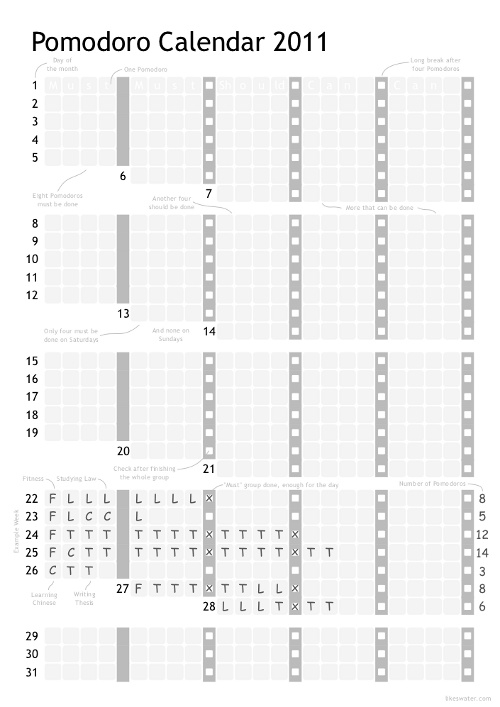
This calendar helps you to track the Pomodoros you finish every day. It includes a page for stats and one for abbreviations.
- Download Pomodoro Calendar 2011
- Download Pomodoro Calendar 2011 (Booklet)